


Picsart AI Photo Editor, Video
4.0441.78K Reviews
App Specs
- Version
- 30.2.6
- Updated On
- License
- Free
- Downloads
- 1,000,000,000+
- Developer
- PicsArt, Inc.
- Categories
- Photography
- Platform
- Android, iOS
Screenshots
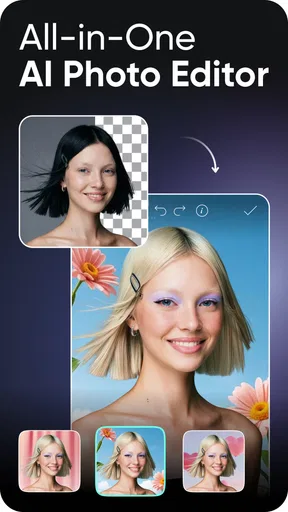
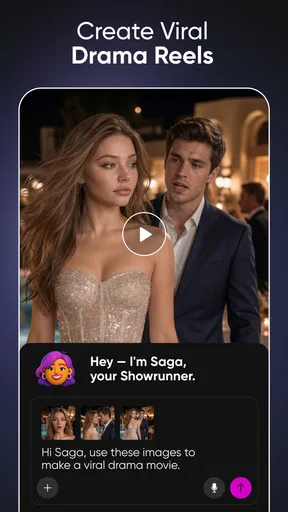
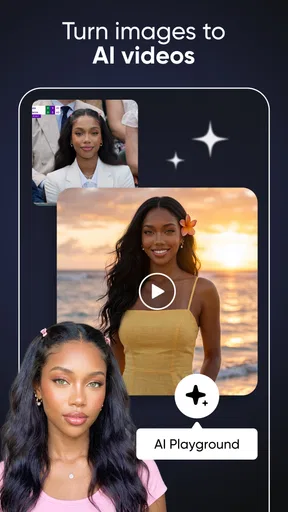
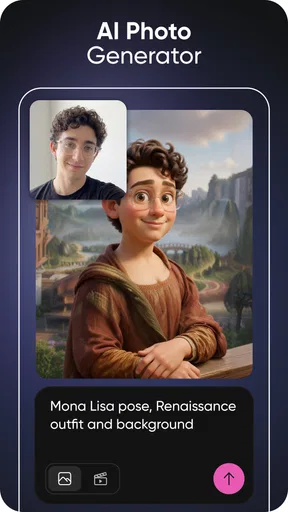
 Analysis by AppCompare
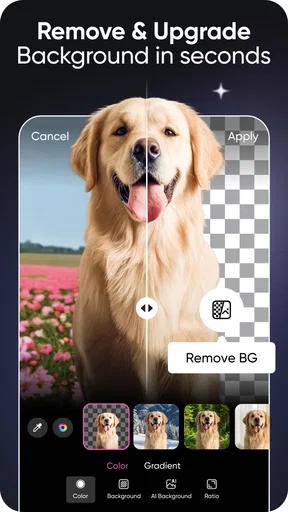
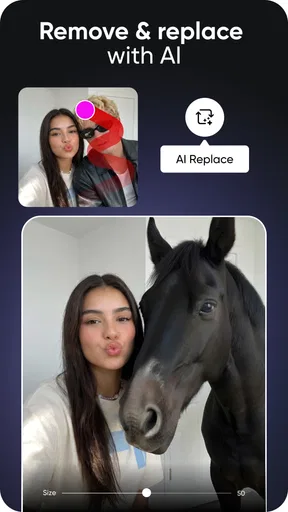
The first few days with Picsart AI Photo Editor, Video can feel like opening a well-stocked craft drawer: there are plenty of ways to change an image, and the quick results make it tempting to try one more edit. I find its strongest initial appeal in practical jobs, especially separating a subject from a busy background or removing a distracting object. Those are the kinds of fixes that can make a snapshot feel ready to share without turning a small task into a desktop editing session.
That quick payoff is useful, but it also sets the right expectation: AI editing is a starting point, not a guarantee that every result will look natural. Hair, transparent edges, and objects that blend into similar colors can be harder to isolate cleanly. I check the cutout at full size before saving, because a fringe around a person or a patch of oddly smoothed detail may be easy to miss in a small preview. For a casual post, a minor imperfection may not matter; for a product image or a print, I would inspect more carefully.
A useful first-week workflow
For a quick portrait edit, I would begin with the original photo, remove the background, and place the subject against a simple replacement rather than a busy scene. A plain color or uncluttered setting makes edge mistakes less noticeable and keeps attention on the person. If the goal is to share a cutout, I would also leave a little space around the subject instead of cropping tightly; that gives the image room to breathe and makes later placement in a post easier.
Guides and Analysis on Picsart AI Photo Editor, Video
Object removal calls for a different kind of restraint. It works best when the unwanted item is small and the surrounding texture is fairly consistent, such as a stray mark on a wall or a minor distraction in a broad patch of sky. If the item covers a face, patterned clothing, or an important boundary, the repaired area has more visual work to do and may look artificial. I would compare the edited image with the original before deciding whether the cleanup is an improvement.
When it earns a place on your phone
As a photography app from PicsArt, Inc., it suits people who regularly make social posts, playful portraits, thumbnails, or quick visual experiments and want several kinds of editing in one place. It is less compelling if you only need to crop a photo occasionally: a basic editor may be faster and easier to keep around. Likewise, anyone who needs precise layer control or a dependable professional retouching workflow may prefer a desktop tool built for that work.
The everyday case I can picture is taking a family photo at a café, then noticing a bright sign behind the person you want to feature. A quick background change can make the picture more focused, but I would keep the replacement believable and avoid changing details that matter to the memory. For a small business owner, the same approach can make a simple product shot less cluttered, though consistent lighting and a clean original photo still matter more than an automatic cutout.
Unlocking Creativity with Ease
Right off the bat, Picsart AI Photo Editor, Video hits you with a sleek and intuitive interface. It’s like the Swiss Army knife of editing apps, but way more fun. Whether you’re a newbie or a seasoned pro, the app has something for everyone. I was pleasantly surprised by how easy it was to navigate. Everything is laid out logically, and the myriad of features are just a tap away.
Worth Reading Before You Choose

Flipboard Shows What News Apps Must Do Beyond the Feed

Switching to Android Auto Means Rethinking Your Driving Routine

Google Calendar Makes a Crowded Week Easier to Manage

Ludo King Makes the Most of the Minutes Between Plans

Baby Panda World Brings Quick Play to Modern Phones, but Its Game Library Feels Busy

ESPN’s Live Game View Makes Following Close Games Easier
Features that Wow
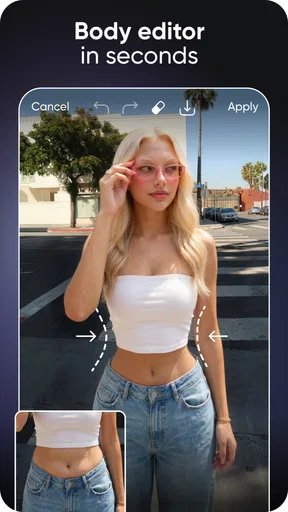
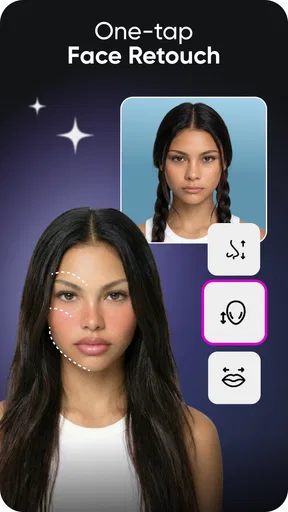
Let’s dive into what makes this app a real standout. The AI-powered tools are nothing short of impressive. You can remove backgrounds, enhance photos with just a tap, and even transform your selfies with beautification tools that feel like they came straight out of a sci-fi movie. It's like having a personal photo studio in your pocket.
And it’s not just about photos. The video editing capabilities are top-notch. I found myself experimenting with effects, transitions, and even music overlays. The drag-and-drop functionality makes it feel like you’re editing on a desktop, but with the convenience of doing it on your phone.
Making the app part of a routine
Novelty is easy; a lasting habit depends on whether an editor saves time on jobs I actually do. The most repeatable value here is having image cleanup and creative changes within the same app, rather than opening a different tool for each small adjustment. I would still keep a simple crop-and-light editor for routine fixes. Picsart earns its space when I want to do more than straighten a frame or brighten a dim shot.
For recurring content, I would settle on a small visual recipe: similar backgrounds, restrained effects, and a consistent crop. That makes a set of posts look related without requiring a new idea for every image. The trade-off is that templates and effects can make different photos feel alike if I rely on them too heavily. I get more lasting use by treating the app’s options as a toolkit, not a prompt to add something to every picture.
Video editing is appealing when I want a short clip to feel more finished, but it is a different commitment from touching up a still image. Choosing transitions and music can be enjoyable for a one-off post; repeating that process for many clips may take longer than a basic trim in a simpler editor. If speed matters more than visual polish, I would use the leanest tool that gets the clip ready and reserve Picsart for edits where effects or a more designed look are the point.
Where it sits beside other editors
Compared with the basic photo tools already available on many phones, Picsart gives me more room to reshape an image, particularly when the background or an unwanted object needs attention. A default gallery editor is often the better choice for a quick crop, rotation, or simple adjustment because it keeps the task direct. For detailed retouching, careful selections, and repeatable professional output, a dedicated desktop editor offers more control. The useful middle ground is the person who wants creative options on a phone but does not need every image to follow a studio workflow.
I would also separate editing from social sharing when deciding whether the community side matters. Browsing other people’s work can spark ideas, but it is not essential to the practical editing jobs. If I want a quiet utility that opens straight into a single correction, the broader creative environment may feel like more than I need. If I enjoy trying styles and learning from examples, that discovery element can help keep the app interesting after the first burst of experimentation.
Month-to-month value and maintenance
There is no reason to keep every edited version or every experiment. I would save the original separately before making a major change, then keep only the finished result and any version I may genuinely want to revise. This simple habit protects a source photo from being lost among alternate backgrounds, filters, and test edits. For images that matter, I would also check the final saved file rather than trusting the editing preview alone.
Keeping a large creative app useful is partly a matter of keeping the workflow tidy. I would decide in advance whether I am editing for a private memory, a social post, or a business image, then stop once the result serves that purpose. That prevents an ordinary portrait from turning into a long chain of effects. The app is most rewarding when I open it with a specific change in mind, not when I feel obliged to explore every tool on every visit.
The practical questions are simple: can I use it for occasional edits, and do I need to pay to get value from it? It is free to start, while optional in-app purchases range from $0.99 to $219.99 per item, so I would check the price shown for any paid option before committing. If my needs are limited to the core cleanup tasks, I would try those first and decide whether the extras solve a recurring problem. The app is rated Teen, has an average rating of 4.0 from around 12 million ratings, and has been installed over a billion times, which shows its broad reach without telling me whether its style or workflow will suit my own habits.
For compatibility, the current version is 29.9.9 and the minimum operating system is Android 6.0. I would check that my device meets that requirement before planning a workflow around it. Picsart was released on November 4, 2011, and its long-running presence makes it a familiar option in mobile creative editing, though the best reason to keep using it is still whether it handles the jobs I return to.
Community and Collaboration
What really sets Picsart apart is its vibrant community. It's not just about editing; it’s about sharing and collaborating. You can discover new edits, get inspired by others, and even join challenges. It’s a bit like having a giant group of creative friends cheering you on.
Plus, the social aspect means you can share your creations directly to all your favorite platforms or keep them private if you’re just experimenting. The app also allows for easy collaboration, letting you work on projects with friends or colleagues. It’s like the creative hub you never knew you needed.
That social layer will not be equally valuable to everyone. I would use it for inspiration when I have a specific visual problem—perhaps looking for a fresh way to frame a portrait—rather than scrolling without a goal. If I prefer to keep photos private, I can focus on editing and avoid making community participation part of the routine. The app’s appeal does not depend on turning every edit into a public post.
One caution with shared creative spaces is that a popular look can become a default. I try to borrow a technique rather than copy a finished style, especially for personal photos. A background swap should support the subject, not make a family memory look like an advertisement; a retouch should preserve the person’s character rather than erase every natural detail. That judgment is part of getting good results, and no automatic tool can make it on my behalf.
When I would choose something else
I would skip Picsart if I want a minimal interface for one repeated task, such as cropping batches of photos, or if I need exact, highly controlled retouching. It is also not the right fit when I do not enjoy experimenting and know I will use only a basic correction. In those cases, the phone’s built-in editor or a specialist tool is likely to feel more direct. On the other hand, if I often switch between playful image changes and social-ready edits, keeping a broader editor available can be more convenient than juggling several narrow apps.
For a first test, I would choose a photo with a clearly separated subject and an uncomplicated background, then try one removal or swap and inspect the edges. That gives a fair sense of whether the automatic result meets my standards without spending time on a difficult image. After that, I would test a more challenging picture only if the app’s core workflow already feels worth returning to. This small trial is more informative than judging the app by its most dramatic effect.
Final Thoughts
All in all, Picsart AI Photo Editor, Video is a powerhouse that doesn’t disappoint. Whether you're looking to create professional-looking photos and videos or just want to have fun with your edits, this app delivers. It’s accessible, feature-rich, and brings out the artist in you. So, if you’re ready to take your editing skills to the next level, give it a try. Trust me, you won’t regret it!
My long-term verdict is a little more practical: I would keep it if I repeatedly use its background and object tools, enjoy experimenting, or make visual content often enough to benefit from having several creative options together. I would not keep it merely because the first few edits are entertaining. The strongest reason to return is a clear task; the strongest reason to move on is discovering that a simpler editor already handles everything I actually do. For the right person, it can become a useful creative workbench rather than a novelty, provided they edit with intention and save only what they need.
Pros
- Intuitive interface for easy editing.
- Wide range of filters and effects.
- AI tools enhance creativity.
- Regular updates with new features.
- Strong community for inspiration.
Cons
- Some features require a subscription.
- Occasional in-app ads can disrupt.
- Large app size may affect storage.
- Learning curve for advanced tools.
- Limited offline functionality.
FAQs for Picsart AI Photo Editor, Video
What features does Picsart AI Photo Editor, Video offer?
Picsart AI Photo Editor, Video offers a comprehensive suite of tools for both photo and video editing. Users can access AI-powered tools for automatic enhancements, a wide range of filters and effects, collage makers, and templates. Additionally, it supports video editing with trimming, transitions, and music integration options to create professional-quality content.
Is Picsart AI Photo Editor, Video free to use?
Picsart AI Photo Editor, Video offers a free version with a variety of features, but to unlock premium tools and remove ads, users can opt for a subscription. The premium version provides access to advanced editing tools, a larger library of filters and effects, and additional content creation resources.
How user-friendly is Picsart AI Photo Editor, Video for beginners?
Picsart AI Photo Editor, Video is designed to be user-friendly, catering to both beginners and advanced users. The interface is intuitive, with easy-to-navigate tools and tutorials to guide new users through the editing process. The app also includes tips and suggestions to enhance the user experience and improve editing skills.
Can I use Picsart AI Photo Editor, Video offline?
While many features of Picsart AI Photo Editor, Video can be accessed offline, some require an internet connection. Downloading additional filters, effects, and accessing cloud storage are online-dependent. However, basic editing tools and previously downloaded content can be used without an internet connection.
Is Picsart AI Photo Editor, Video suitable for professional use?
Picsart AI Photo Editor, Video is suitable for both amateur and professional use. It offers a broad range of advanced editing tools that can meet the needs of professional creators. From AI-driven enhancements to custom editing options, it supports high-quality output, making it a versatile tool for professionals.


